Why Choose Smart Lighting Control for Your Business?
Smart Lighting Control is becoming a practical business decision, not merely a technology upgrade. In offices, retail stores, warehouses, and hospitality spaces, connected lighting can adjust brightness, timing, and occupancy responses. A meeting room can brighten when people enter. A storage aisle can remain dim until movement is detected. These small changes may reduce wasted energy and improve daily comfort.
Lighting researcher Dr. Mariana Figueiro has stated, “Light is the most powerful synchronizer of the human circadian system.” Her work at the Lighting Research Center gives this topic strong scientific authority. It also explains why business lighting should consider more than visibility. Color temperature, exposure timing, glare, and individual sensitivity can affect how people experience a space.
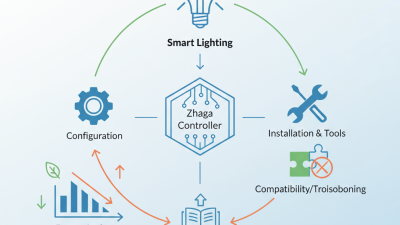
The practical benefits are measurable. Energy monitoring can reveal unnecessary lighting during empty hours. Automated schedules can support predictable operations. Occupancy sensors can reduce use in low-traffic areas. Smart Lighting Control can also help facility teams identify failed fixtures before complaints increase. That sounds efficient.
Still, the case is not flawless. Poor sensor placement may create dark corners or frequent switching. Excessive automation can frustrate employees who need personal control. Installation costs, software compatibility, and maintenance requirements deserve careful review. A thoughtful plan begins with an audit, not a sales promise. Businesses should compare energy data, worker feedback, and maintenance records before expanding the system. The best solution is rarely the most complicated one.
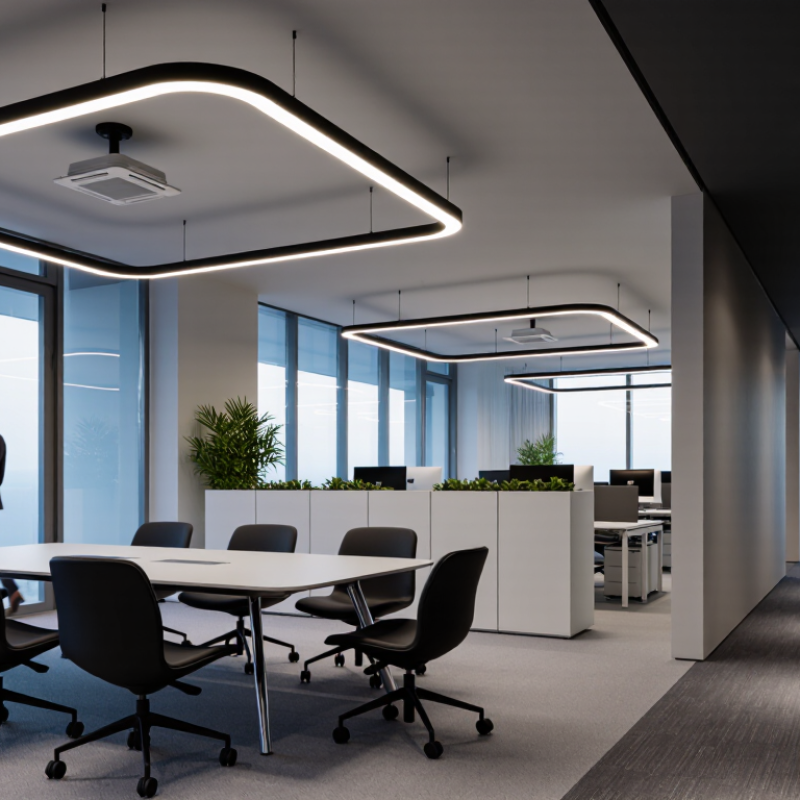
Smart lighting control connects fixtures, sensors, schedules, and user settings through one coordinated system. It adjusts illumination according to occupancy, daylight, time, and operational needs. In a meeting room, lights can dim when sunlight reaches the worktables. In a corridor, they can brighten when movement is detected. These actions reduce unnecessary energy use without leaving employees in dark spaces.
The system also gives facility teams clearer control. They can divide a building into zones, review lighting activity, and change settings from a central interface. A manager might schedule brighter lighting during loading hours and lower levels after staff leave. Manual overrides remain important for maintenance, events, and unexpected work. Practical experience shows that thoughtful commissioning matters as much as the equipment itself.
It is not completely automatic. Sensors can misread motion behind glass or miss a quiet worker at a desk. Poorly chosen settings may frustrate employees and reduce trust. Teams should test each zone, collect feedback, and adjust gradually. Access permissions and system security also require regular review. Smart control works best when technology supports daily routines, rather than forcing every workplace into one rigid pattern.
Why Choose Smart Lighting Control for Your Business?
How Smart Lighting Systems Operate and Connect
Smart lighting systems combine fixtures, sensors, controllers, and communication networks. Each component has a practical role. Occupancy sensors detect movement in a meeting room or corridor. Daylight sensors measure available sunlight near windows. A controller then adjusts brightness according to programmed rules, schedules, or live conditions. The result is more responsive lighting than fixed switches can provide.
In a typical office retrofit, technicians connect lighting zones through wired networks, wireless signals, or both. A gateway may link local equipment with a secure management platform. Users can check energy data, change schedules, and receive fault alerts from a central interface. Local controls remain important, however. If the network fails, essential lights should still operate safely. That detail is easy to overlook.
Good performance depends on careful setup. A poorly aimed sensor may turn lights off while someone is reading quietly. Excessive sensitivity can create constant switching. Small errors matter. Technicians should test each zone at different times of day, then adjust timeout periods and brightness levels. Access permissions also need regular review. Connected lighting improves control, but it is not automatically perfect. Maintenance teams must inspect sensors, update settings, and question unusual energy readings before accepting the system’s assumptions.
Smart lighting control gives businesses more than convenient on-and-off switches. It adjusts brightness, timing, and zones according to occupancy, daylight, and operating hours. In a small office, corridor lights can dim after desks empty, while work areas stay comfortable. This reduces wasted electricity without leaving employees in dark spaces. Facility teams can review usage data and identify rooms consuming power after closing. The savings become visible, not assumed.
The business value also appears in daily work. Consistent task lighting can reduce glare over monitors and make printed documents easier to read. In retail or hospitality areas, warmer evening settings may create a calmer customer experience. Motion-based lighting can improve visibility in storage rooms and stairways. Managers gain remote control during inspections or unexpected schedule changes. These controls support maintenance too. A failed sensor or unusual energy spike can reveal a problem before it becomes expensive.
However, smart control is not automatically efficient. Incorrect sensor placement can switch lights off during quiet work, frustrating employees. Overly complex schedules may confuse staff and increase service calls. A practical installation should begin with occupancy patterns, light measurements, and user feedback. I would test one zone, compare energy readings, and adjust brightness gradually. Training matters. So does a manual override. Businesses should judge performance across several weeks, not one impressive dashboard screenshot. This honest review may expose weaker savings, but it creates a more reliable system.
Smart lighting control fits businesses with changing schedules, occupancy levels, and operating zones. In offices, sensors can dim meeting rooms after staff leave. Daylight controls can reduce output near windows while maintaining comfortable work surfaces. Managers can also adjust lighting by floor instead of checking every switch.
Retail stores use smart controls to highlight displays, guide customer movement, and create brighter fitting areas. In hotels and restaurants, timed scenes can support check-in, dining, cleaning, and overnight security. Warehouses benefit from motion sensors that brighten active aisles and lower output in empty storage zones. Small changes matter.
Healthcare facilities and schools often need steady, practical illumination. Smart controls can support patient rooms, corridors, classrooms, and shared spaces without treating every area identically. A corridor may need low nighttime lighting, while a treatment room requires stronger, more consistent output. These settings should be planned with facility staff, not guessed from a drawing.
Real installation experience shows that control quality depends on more than hardware. Sensors need suitable placement, clear zoning, and regular commissioning. Staff also need simple instructions. Otherwise, people may disable useful settings when lights respond too slowly. That happened in one trial area, and the programming required revision. Energy savings are possible, but comfort, accessibility, maintenance, and local safety requirements should remain central.
Why Choose Smart Lighting Control for Your Business?
How to Evaluate and Select a Smart Lighting System
A smart lighting system should solve a real business problem, not simply add a modern dashboard. Start by measuring room sizes, current lighting levels, operating hours, and energy costs. Observe how staff use meeting rooms, corridors, storage areas, and workstations. These details reveal where occupancy sensors or daylight controls may create value. They also prevent unnecessary automation.
Check the system’s performance with documented testing data. Ask how accurately sensors detect movement, how quickly lights respond, and how smoothly scenes operate. Confirm compatibility with existing wiring, switches, emergency lighting, and building controls. Open communication standards can reduce future replacement risks. Cybersecurity also matters. Review user permissions, software updates, data storage, and remote access procedures. A professional supplier should explain these points clearly.
Request a pilot installation in one busy area. Compare measured energy use, lighting comfort, maintenance needs, and employee feedback before expanding. Watch for flicker, delayed activation, or lights switching off during quiet work. Small problems become expensive across an entire building. A lower initial price may hide training, integration, or maintenance costs. I would also challenge optimistic savings estimates. They may depend on perfect sensor placement and consistent staff behavior, which rarely happens. Reliable selection includes a clear warranty, practical support, commissioning records, and a realistic plan for system changes.