How to Use Smart LED Strip and Smart Street Light Controller?
The rise of smart technology has transformed urban lighting solutions. Smart LED strips and smart street light controllers are at the forefront of this shift. According to a recent report by MarketsandMarkets, the smart lighting market is expected to reach $45.8 billion by 2024. This growth indicates a strong shift toward innovative lighting technologies.
Smart LED strips provide customizable lighting that can enhance ambiance in various settings. These strips are energy-efficient, reducing power usage by up to 30%. Similarly, smart street light controllers optimize urban lighting. They adapt to real-time conditions, saving energy and reducing costs. A study by the International Energy Agency suggests that smart street lighting can cut energy costs by as much as 50%.
However, challenges remain. Many users lack knowledge about these technologies. They may struggle with installation or integration with existing systems. Additionally, concerns about data security in smart lighting systems are growing. Addressing these issues is crucial for broader adoption. As we explore how to effectively utilize smart LED strips and smart street light controllers, a reflective approach will be essential.
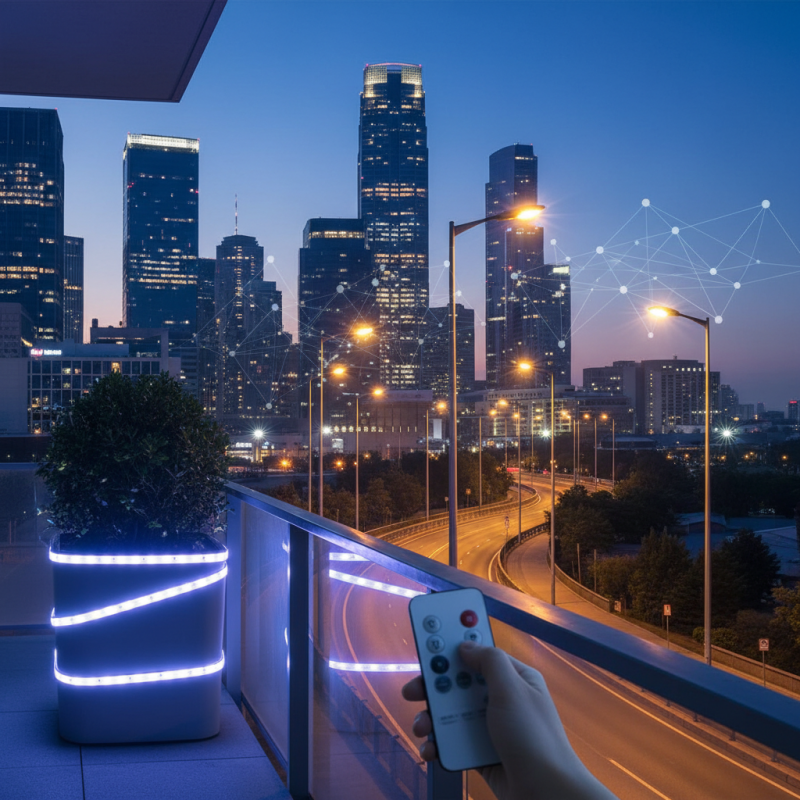
Understanding Smart LED Strip Technology
Smart LED strip technology has transformed the way we light our homes and public spaces. These flexible circuits contain numerous tiny LEDs. They can be customized in color and brightness. This allows for unique lighting experiences. You can create an array of effects. Changing the mood of a room is easy with a tap or swipe.
The control system behind these strips makes all the difference. Users can connect them to smart devices. Adjustments can be made remotely, enhancing convenience. But, while smart technology offers efficiency, it’s not always flawless. Sometimes, connectivity issues can interrupt use. Additionally, understanding the software might be challenging for newcomers.
Energy efficiency is another perk. Smart LED strips consume less power than traditional bulbs. They can last a long time, reducing waste. However, people often forget to turn them off. This can lead to unnecessary energy use. Regularly checking settings is essential for maintaining efficiency.
Essential Components of Smart LED Strip Systems
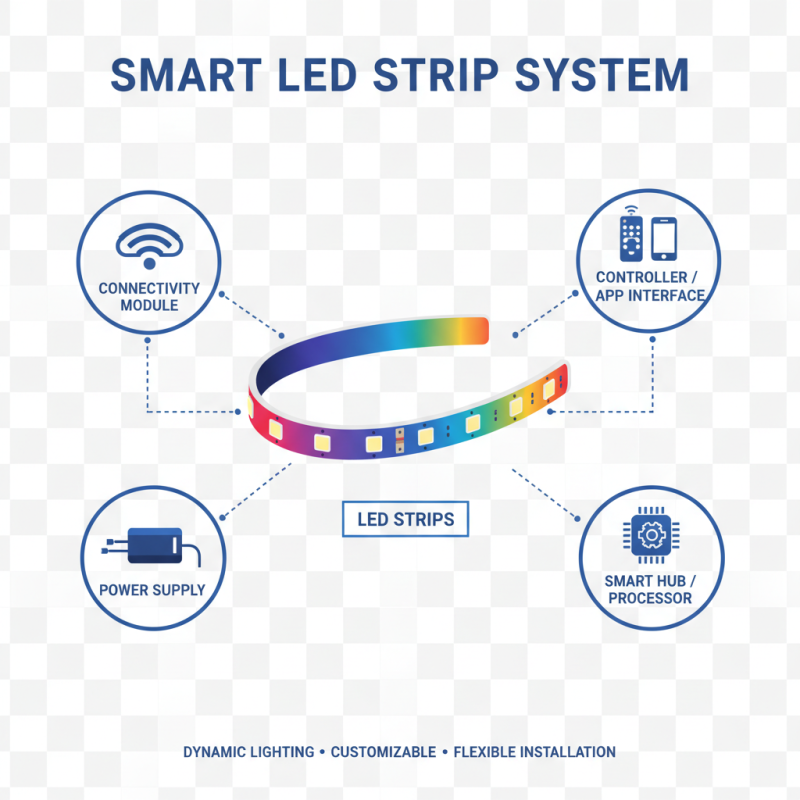
Smart LED strip systems consist of several essential components that come together to create dynamic lighting experiences. The LED strips themselves are flexible, allowing for creative installation in various spaces. Each strip usually contains multiple small LEDs that emit vibrant colors. These lights can change brightness and hue, responding to user input.
A controller is key to the functionality of smart LED strips. It connects to a smartphone or a home automation system. Users can program the lights, set schedules, and customize colors. A power supply is equally important. It ensures that the strips get enough energy to function properly. Often, users may overlook the power requirements, leading to inconsistencies in performance.
Sensors add another layer of sophistication. They can detect movement or ambient light levels, prompting the lights to adjust automatically. However, calibration can be tricky. Sometimes, the sensors fail to respond as expected. Regular checks are advisable to ensure everything works smoothly. Combining these elements creates a versatile and user-friendly smart lighting solution. Yet, the complexity can be overwhelming for those new to smart technology.
Setting Up Your Smart Street Light Controller
Setting up your smart street light controller can be straightforward yet challenging at times. Begin by choosing a suitable location for the controller, ideally within reach of your smart LED strip. Ensure the area has good connectivity. Poor signal strength can cause disruptions during use.
Next, follow the manufacturer’s instructions to connect the controller. This step can sometimes be tricky. Some users report difficulties in pairing devices. Make sure your smart LED strips are powered and within range during the setup. A common mistake is neglecting to update the software. Doing this often resolves initial issues.
Once connected, customize the lighting preferences. You can adjust brightness and color depending on the time of day. Experimenting with different settings can be fun. But remember, trial and error may lead to unexpected results. Some users find their initial configurations don't work as intended. It’s essential to stay patient and make adjustments as needed.
Integrating Smart LED Strips with Home Automation
Integrating smart LED strips into home automation is both exciting and practical. You can start by planning where to place the strips. Think about areas that lack light. When you add color to those spaces, it makes a difference. Choose the right length and type for each room. Confusion can arise if the strips don't blend well with your home style. It requires some testing to get it right.
Once you have the strips in place, connect them to a central hub. This hub allows you to control the lights from your phone or voice. It can be tricky at first. Sometimes, connectivity issues occur. You may need to troubleshoot the app or settings. Don't hesitate to seek help online or through forums if difficulties arise.
Automation can enhance the ambiance. Set schedules for different moods. You might want soft lights in the evening or bright lights when working. Remember to experiment with colors and brightness levels. These adjustments can transform your space. It’s about finding what works best for you. Embrace the process, and don't rush it. Each step can teach you something valuable about design and functionality.
How to Use Smart LED Strip and Smart Street Light Controller? - Integrating Smart LED Strips with Home Automation
| Feature |
Description |
Benefits |
Integration |
| Smart LED Strips |
Flexible LED lighting that can change colors and brightness. |
Energy-efficient lighting, customizable ambiance, easy installation. |
Compatible with home automation systems for remote control. |
| Smart Street Light Controller |
Device that controls street lighting remotely via a mobile app. |
Reduces energy consumption, improves public safety, and allows for real-time monitoring. |
Can be integrated into city-wide smart management systems. |
| Connectivity |
Wi-Fi, Bluetooth, Zigbee connectivity options available. |
Allows for seamless communication between devices. |
Enables integration with other smart home devices. |
| Control Options |
Voice control, mobile app, and automation schedules. |
Enhanced user experience and convenience. |
Can be programmed for specific times and events. |
| Maintenance |
Remote diagnostics and updates available. |
Minimizes downtime and maintenance costs. |
Supports proactive management of lighting systems. |
Troubleshooting Common Issues with Smart Lighting Systems
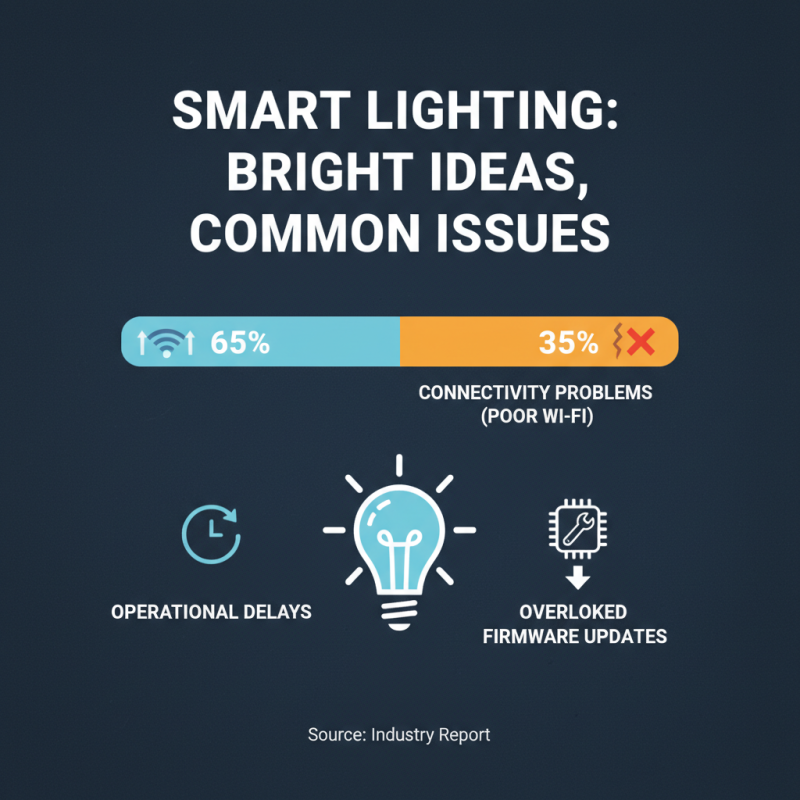
Smart lighting systems, including LED strips and street light controllers, have revolutionized how we illuminate our spaces. However, they are not without their issues. According to a recent industry report, 35% of users face connectivity problems due to poor Wi-Fi signals. This often leads to frustrating delays in operation. Regular updates to firmware can help mitigate some of these problems but are often overlooked.
Another common issue is inconsistent brightness levels. A survey indicated that nearly 25% of users reported that their smart lights dim unexpectedly. This inconsistency can stem from incompatible devices or incorrect configurations. Checking compatibility and ensuring a stable power supply may resolve these issues. Additionally, environmental factors like temperature can affect performance, leading to flickering or buzzing noises.
Lastly, troubleshooting can be daunting. Many users struggle with resetting devices. A significant number of smart light users often forget this vital step when problems arise. Clear instructions on resetting the controller can save time and frustration. Taking these factors into consideration can lead to a more seamless user experience in the realm of smart lighting.